Table of Contents
Most model launches leak for weeks. This one didn't. On July 15, 2026, Thinking Machines Lab — the roughly 200-person startup that ex-OpenAI CTO Mira Murati has kept in near-total stealth for over a year — dropped Inkling, a 975-billion-parameter open-weight model, with the full weights on Hugging Face the same afternoon. Within hours, the independent Artificial Analysis Intelligence Index had it ranked as the strongest open-weights model any U.S. lab has released.
Inkling is not another chatbot. It is a multimodal reasoning engine that natively reads text, images, video frames, and audio — and it is free to run and fine-tune. This guide breaks down what it is in plain English, how strong it actually is, how it compares to other open models, and what it costs to use.
Inkling in one paragraph
Inkling is a Mixture-of-Experts (MoE) model with 975B total parameters but only ~41B active on any given token, trained on 45 trillion tokens of text, image, audio, and video. It accepts all four input types and outputs text. It supports a 1M-token context window (256K on the hosted platform), lets you dial reasoning effort up or down to trade accuracy for speed and cost, and ships with open weights you can download, self-host, or customize. Thinking Machines is candid that it is "not the strongest overall model available today, open or closed" — but on independent testing it is the best open-weights model from a U.S. lab, and unusually token-efficient.
Rule of thumb: Think of Inkling as a strong, customizable starting point you own — not a finished product you rent. That distinction drives every design choice below.
What Inkling actually is: 975B parameters, but only 41B do the work
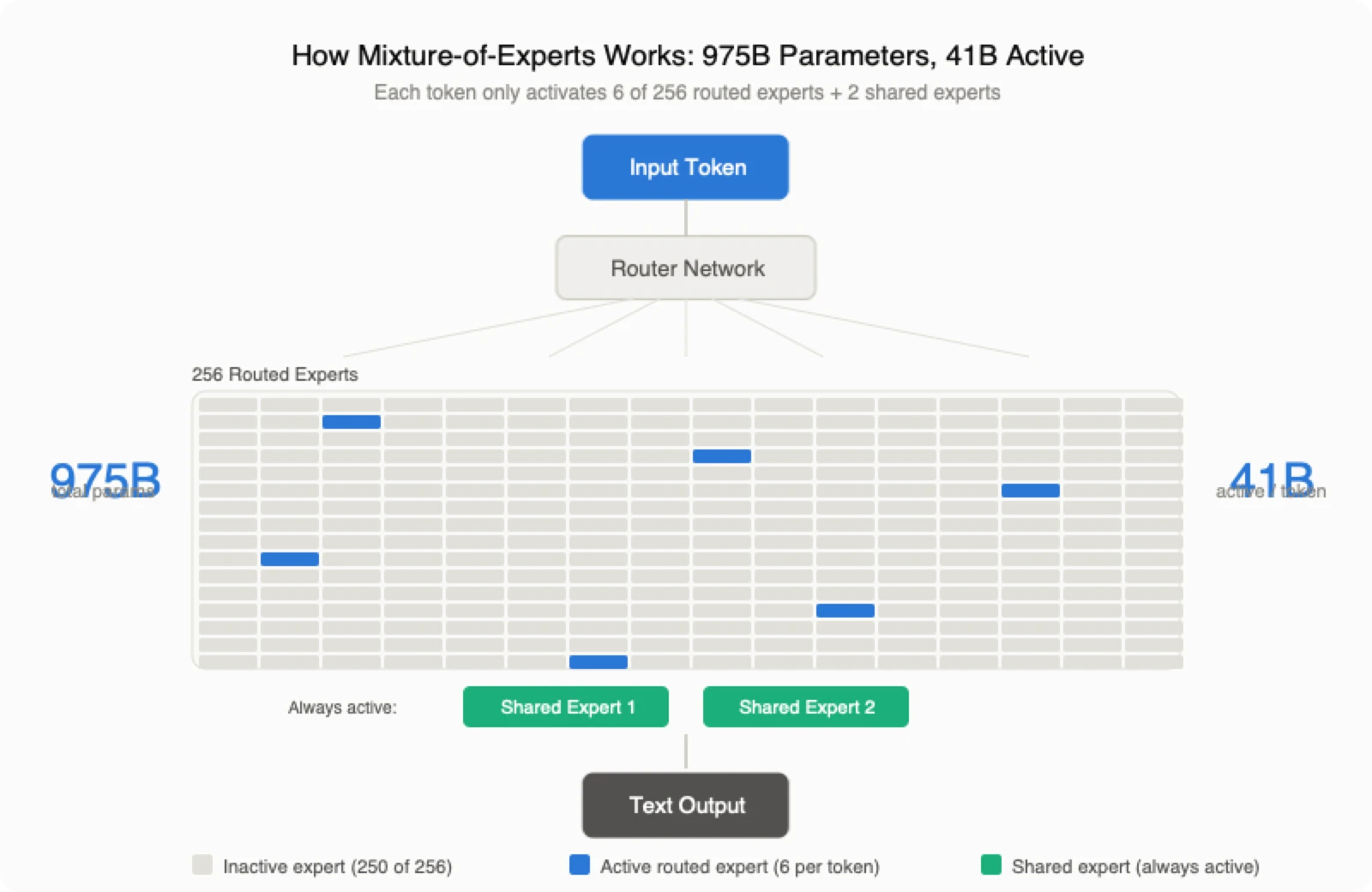
The headline number — 975B parameters — sounds enormous, and it is. But Inkling is a Mixture-of-Experts model, which means it is split into many specialized sub-networks ("experts") and only routes each token to a handful of them.
Concretely: each layer has 256 routed experts plus 2 shared experts, and only 6 routed experts fire per token. So while the model stores 975B parameters, it only computes with about 41B at a time. That is the whole trick behind modern open models — you get the knowledge capacity of a giant model at roughly the inference cost of a mid-sized one.
A few architecture details that matter in practice:
| Component | Design | Why it matters |
|---|---|---|
| Total / active params | 975B / 41B (MoE) | Big-model quality, mid-model inference cost |
| Experts | 256 routed + 2 shared, 6 active per token | Sparse routing keeps compute low |
| Attention | Interleaved sliding-window + global, 5:1 | Handles long context efficiently |
| Context window | 1M tokens (open weights); 256K hosted | Long documents, codebases, transcripts |
| Training data | 45T tokens: text, image, audio, video | Native multimodal understanding |
| Output | Text only (for now) | It reasons about media; it doesn't generate it |
That last row is easy to misread. Inkling can watch a video clip and reason about it, but it does not generate video or images. It is an analytical reasoning engine, not a content generator.
Controllable thinking: one model, adjustable effort
The most genuinely novel feature is controllable thinking effort. Instead of shipping separate "fast" and "reasoning" models, Inkling lets you dial how much it thinks via the system message and a per-token cost setting. Turn effort down for cheap, snappy replies; turn it up and accuracy climbs, at the cost of more tokens.
Thinking Machines trained this behavior directly through reinforcement learning — over 30 million rollouts — and something odd emerged along the way: as training progressed, the model's chain-of-thought got shorter and more telegraphic, shedding grammatical filler while staying correct. Team member Tim Li described it as reasoning "like a caveman mathematician." The practical payoff is efficiency: on independent testing, Inkling averages about 25K output tokens per hard task, versus 43K, 38K, and 37K for GLM-5.2, Kimi K2.6, and DeepSeek v4 Pro. On coding, it reportedly hits Nemotron 3 Ultra's level using roughly one-third the tokens.
For anyone paying per token, "same score, one-third the tokens" is not a benchmark footnote — it is your bill.
Multimodal by design: text, image, video, and audio in
Inkling was multimodal from pretraining, not bolted on afterward. Images and video frames are encoded through a hierarchical patch encoder; audio is turned into discrete tokens; and every modality is projected into one shared space the decoder reasons over jointly. That means you can hand it a screenshot, a chart, a short clip, or a voice memo and ask it to describe, transcribe, answer questions, or reason — optionally calling a Python tool for visual math.
This is still rare among open-weights models, most of which are text-only or vision-only. Native audio and video understanding in a downloadable model is the real differentiator here.
How strong is it, really?
Benchmarks were measured at high thinking effort (0.99). The short version: excellent at reasoning and agentic coding, strong on multimodal, honest about not topping every closed model.
| Area | Benchmark | Inkling |
|---|---|---|
| Math reasoning | AIME 2026 | 97.1% |
| Science | GPQA Diamond | 87.2% |
| Hard knowledge | Humanities' Last Exam (with tools) | 46.0% |
| Agentic coding | SWE-bench Verified | 77.6% |
| Terminal use | Terminal Bench 2.1 | 63.8% |
| Vision | MMMU Pro | 73.5% |
| Audio | VoiceBench | 91.4% |
| Safety | StrongREJECT | 98.6% |
The most credible outside signal comes from Artificial Analysis, which placed Inkling at 41 on its Intelligence Index — the leading U.S. open-weights model, ahead of Nemotron 3 Ultra (38), Gemma 4 31B (29), and gpt-oss-120b (24). It also outscored Kimi K2.6 and DeepSeek v4 Flash on agentic tasks.
Inkling vs other open models: how to choose
No single open model wins everything. Here is how Inkling lines up against the current open-weights field, using the makers' own reported numbers:
| Benchmark | Inkling | Nemotron 3 Ultra | Kimi K2.6 | GLM 5.2 |
|---|---|---|---|---|
| AIME 2026 | 97.1% | 94.2% | 96.4% | 99.2% |
| SWE-bench Verified | 77.6% | 70.7% | 80.2% | 80.0% |
| MMMU Pro | 73.5% | — | 79.0% | — |
| Intelligence Index (AA) | 41 | 38 | — | — |
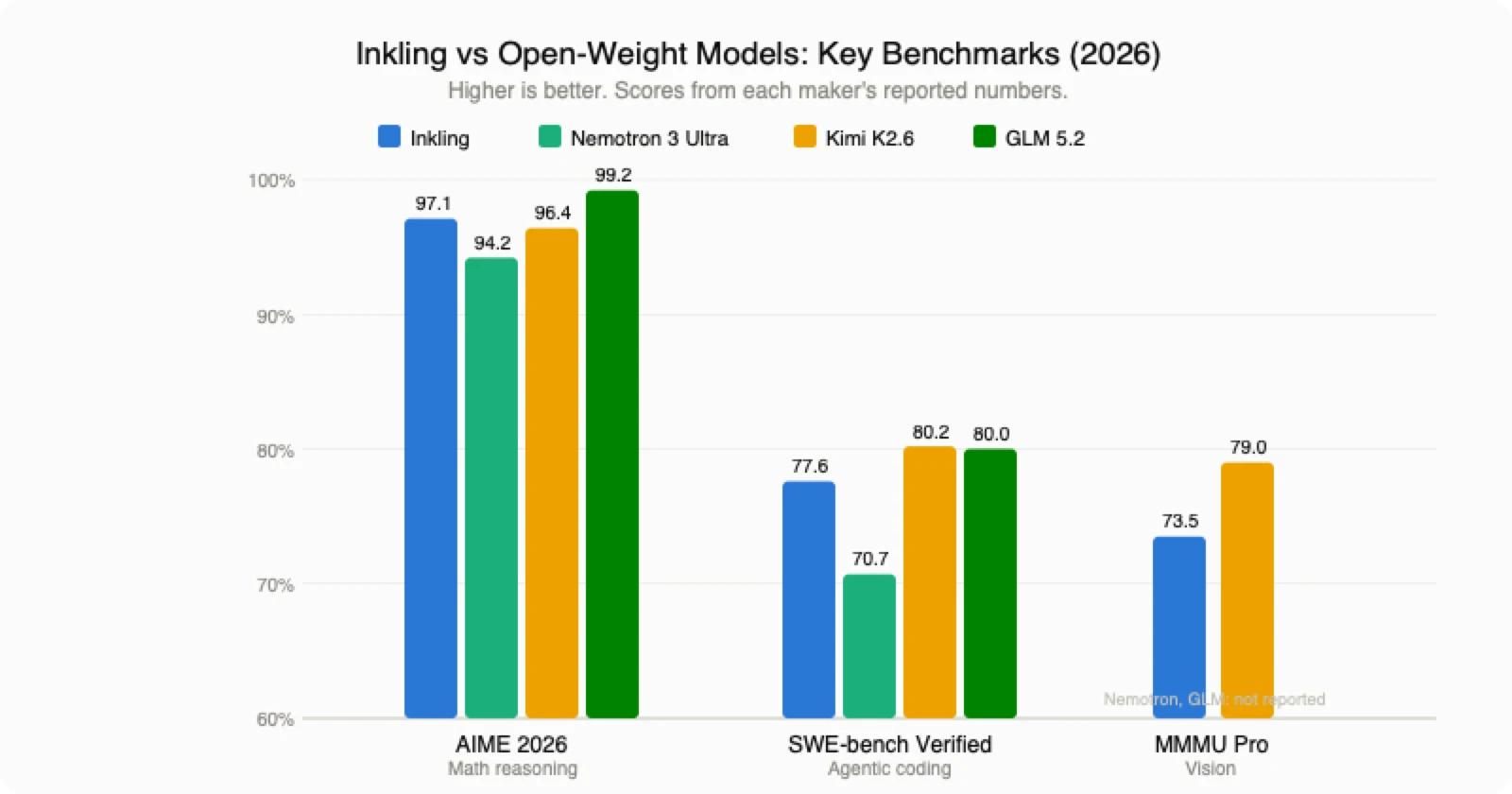
Read it this way:
- Pick Inkling when you need native multimodal input (image/video/audio), token efficiency, or a strong base you intend to fine-tune.
- Pick Kimi K2.6 or GLM 5.2 if raw coding score is your single priority and you don't need multimodality.
- Pick a closed frontier model only when you need the absolute top of a benchmark and are willing to rent it.
Rule of thumb: If your workload is repetitive and domain-specific, a fine-tuned open model usually beats renting a bigger closed one — Bridgewater reportedly hit 84.7% on financial reasoning with a customized open model at roughly one-fourteenth the running cost.
How to use Inkling: download, fine-tune, or call an API
You have three realistic paths, from easiest to most hands-on.
1. Try it free on Tinker (zero setup). Thinking Machines' Tinker platform has a free playground with integrated web search — no API key, no GPU, no install. Start here to see whether Inkling fits your task before committing to anything else. If it does, Tinker also offers fine-tuning with 64K and 256K context options and a limited-time 50% discount.
2. Call a hosted API. If you just want tokens in your own code, day-0 partners include Together AI, Fireworks, Modal, Databricks, and Baseten. Hosted pricing on Tinker looks like this:
| Context | Input / 1M | Cached input / 1M | Output / 1M |
|---|---|---|---|
| 64K | $1.87 | $0.374 | $4.68 |
| 256K | $3.74 | $0.748 | $9.36 |
For a frontier-class multimodal model, that is aggressively cheap — a direct consequence of the open-weights strategy.
3. Download the weights (self-host). The full model is on Hugging Face at thinkingmachines/inkling, including an NVFP4 checkpoint tuned for NVIDIA Blackwell hardware. Serving is supported across SGLang, vLLM, llama.cpp (via Unsloth), and Hugging Face Transformers. This gives you the 1M-token context and full control — but you need serious GPUs.
Why an open model matters
Thinking Machines is making a bet against one-size-fits-all AI. Its argument: with closed models, enterprises effectively pay twice — once for the subscription, and again by feeding proprietary knowledge into prompts that the vendor can absorb into future versions. An open-weight base you fine-tune and host yourself sidesteps both problems.
Because open weights can't be metered, the company doesn't sell model access; it sells the training and customization layer (Tinker) plus a cut of the hosting ecosystem. It's a different revenue theory than OpenAI's or Anthropic's, and Inkling is the proof-of-concept. One honest caveat from the team: some early post-training data was bootstrapped from other open models (including Kimi K2.5), with a promise that the next model will use fully self-contained post-training. Researchers also noted the architecture closely resembles DeepSeek V3 — a reminder that, increasingly, data and training recipes matter more than novel architecture.
Inkling-small: a lighter preview
Alongside the flagship, Thinking Machines previewed Inkling-small — 276B total / 12B active — which reportedly matches the full model on some reasoning benchmarks (Humanities' Last Exam text: 29.6% vs 29.7%) while being cheaper and faster to run. It isn't fully released yet, but it signals the plan: a family of sizes so teams can pick the latency-cost tradeoff that fits, then fine-tune from there.
Frequently asked questions
Is Inkling open source and free? It is open-weights: you can download, run, and fine-tune the model for free. That's not identical to a fully open-source license, but the weights are publicly available on Hugging Face.
How big is it, and can I run it locally? 975B total parameters with 41B active. You can self-host it (SGLang, vLLM, llama.cpp, Transformers), but you'll need substantial GPU memory. Most people will fine-tune on Tinker or call a hosted API instead.
Is it really multimodal? Yes for input — text, images, video frames, and audio. Output is text only; it reasons about media, it doesn't generate video or images.
How does it compare to DeepSeek or Kimi? Competitive-to-better on agentic tasks and more token-efficient, with the extra edge of native audio and video input. Pure coding scores slightly favor Kimi K2.6 and GLM 5.2.
What does it cost? Hosted pricing starts at $1.87 per million input tokens and $4.68 per million output tokens (64K context) — cheap for a model of this class.
Core Summary
Inkling is the clearest sign yet that serious, customizable AI is moving into the open. It won't top every leaderboard, and it doesn't generate video or images — but as a 975B multimodal MoE that's cheap to run, dials its own reasoning effort, and reads image, video, and audio natively, it's a genuinely useful base for anyone building on top of models rather than just chatting with them.
If you want to explore it, Thinking Machines' official Inkling announcement links to both the free Tinker playground and the Hugging Face weights.