Table of Contents
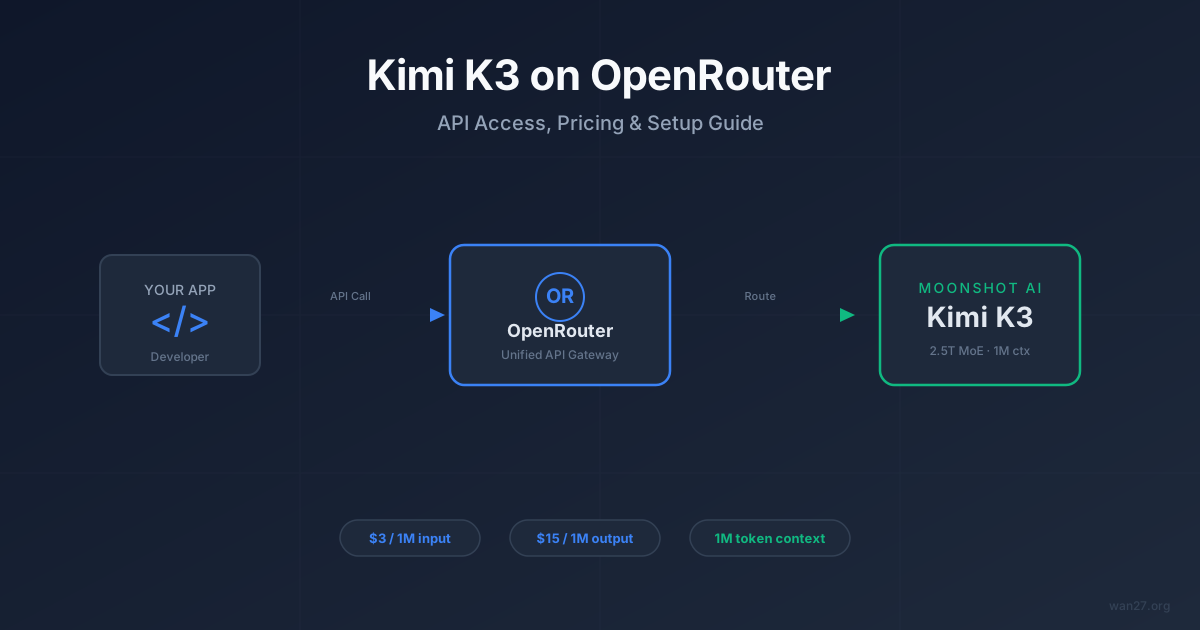
The model slug is moonshotai/kimi-k3. Not moonshot/kimi-k3. Not kimi-k3. Not moonshotai/kimi-k3-chat.
That one wrong character in the organization prefix — moonshot instead of moonshotai — is the single most common reason developers get a 404 on their first Kimi K3 API call through OpenRouter. The error message just says "model not found." It does not tell you the slug was close. At least three community posts within 24 hours of K3's July 16, 2026 launch show people debugging this exact problem.
If you are here because your request returned a 404, you are in the right place.
K3 went live on OpenRouter the same day Moonshot officially released it — meaning third-party API access was available from day one, not weeks later like some previous Kimi models. We verified the model ID, pricing, and feature support by making actual API calls through OpenRouter's endpoint, cross-referencing against Moonshot's official pricing page, and checking the OpenRouter model catalog and community reports. This guide covers what we confirmed: how to get K3 running through OpenRouter in under 5 minutes, what the pricing actually is (the leaked pre-release numbers were 3–4× too low), how OpenRouter compares to the direct Moonshot API and AWS Marketplace, and when OpenRouter is the right choice versus going direct.
Kimi K3 on OpenRouter: Quick Reference
Before any explanation, here is everything you need to make your first successful API call:
| Detail | Value |
|---|---|
| Model ID | moonshotai/kimi-k3 |
| Alternative slug | ~moonshotai/kimi-latest (auto-redirects to latest Kimi model) |
| Context window | 1,048,576 tokens |
| Input pricing | $3.00 / 1M tokens |
| Output pricing | $15.00 / 1M tokens |
| API format | OpenAI-compatible (/v1/chat/completions) |
| Streaming | Supported |
| Tool use | Supported |
| Structured JSON output | Supported |
| Vision (image input) | Supported |
| Web search | $0.015 per call |
| Provider count | Single provider |
Expert pitfall: the ~moonshotai/kimi-latest slug is convenient but dangerous in production. It auto-redirects to whatever Moonshot's newest model is. Today that is K3. Tomorrow it could be K3.1 or K3-turbo with different behavior, output formatting, or pricing. Pin to moonshotai/kimi-k3 for any workflow where reproducibility matters.
That covers the what. The next question is whether OpenRouter is even the right place to access K3 — because you have three options, and they are not interchangeable.
Why OpenRouter Instead of the Direct API? Three Scenarios Where It Wins
You can access K3 through three channels right now: Moonshot's own platform API, OpenRouter, and AWS Marketplace. The direct API at platform.moonshot.cn (or the international endpoint at platform.kimi.ai) gives you the lowest latency and native features. So why would you route through OpenRouter instead?
Three situations make OpenRouter the better choice:
1. You already use OpenRouter for other models. If your stack already calls GPT-5.6, Fable 5, or GLM-5.2 through OpenRouter, adding K3 is a one-line change — swap the model ID, keep everything else. No new API key, no new billing account, no new SDK.
2. You want a single billing dashboard. OpenRouter consolidates spend across all models. If you are running A/B tests between K3 and three other models, one invoice beats four.
3. You need fallback routing. OpenRouter supports automatic model fallback. If K3's single provider goes down, you can configure a fallback chain to K2.7 Code or another model without changing your application code.
The direct API wins on latency, native features (like Moonshot-specific tool schemas), and sometimes on pricing when Moonshot runs promotions. AWS Marketplace wins if you need enterprise billing through existing AWS contracts.
Rule of thumb: If K3 is your primary production model and you are making more than 10,000 requests per day, benchmark the direct API first. If K3 is one of several models you are evaluating or using in rotation, OpenRouter saves integration time.
If OpenRouter is the right fit, the setup is fast. Four steps, no new SDK, no new billing account.
Step-by-Step: First K3 API Call in Under 5 Minutes
You need a funded OpenRouter account — nothing else.
Step 1: Get your OpenRouter API key
Go to openrouter.ai, sign in, and navigate to Keys in your dashboard. Create a new key or use an existing one. Copy it — you will not see it again.
Step 2: Verify K3 is available
Before writing any code, confirm the model is live with a simple curl request:
curl https://openrouter.ai/api/v1/models \
  -H "Authorization: Bearer $OPENROUTER_API_KEY" \
  | grep -o '"moonshotai/kimi-k3"'
If this returns "moonshotai/kimi-k3", you are good. If it returns nothing, check your API key or try again in a few minutes.
Step 3: Make your first chat completion
curl https://openrouter.ai/api/v1/chat/completions \
  -H "Authorization: Bearer $OPENROUTER_API_KEY" \
  -H "Content-Type: application/json" \
  -d '{
    "model": "moonshotai/kimi-k3",
    "messages": [
      {"role": "user", "content": "Explain mixture-of-experts architecture in two sentences."}
    ]
  }'
If you get a JSON response with a choices array containing the model's answer, your setup is complete. If you get "error": "model not found", double-check the model ID — it must be moonshotai/kimi-k3, not moonshot/kimi-k3.
Step 4: Switch to the OpenAI Python SDK
Since OpenRouter uses the OpenAI-compatible format, the official OpenAI Python SDK works with zero modifications beyond the base URL and API key:
from openai import OpenAI

client = OpenAI(
    base_url="https://openrouter.ai/api/v1",
    api_key="your-openrouter-api-key",
)

response = client.chat.completions.create(
    model="moonshotai/kimi-k3",
    messages=[
        {"role": "user", "content": "What are the trade-offs of MoE vs dense transformers?"}
    ],
)

print(response.choices[0].message.content)
This is all you need for basic text generation. For streaming, tool use, or structured output, see the sections below.
Rule of thumb: Always test with a simple prompt first. If the simple call works, you know auth, routing, and billing are correct. Debug features like streaming or tools only after the basic path succeeds.
Basic text generation is working. Now add the three features that separate a quick test from a production integration.
Streaming, Tools, and Structured JSON: What Works (and What Doesn't)
K3 on OpenRouter supports the three features that matter most for production integration. But there is a nuance worth understanding: OpenRouter is not a simple proxy. It receives your OpenAI-format request, translates it into whatever format the upstream provider expects, forwards it, then translates the response back. For K3, the upstream provider speaks an OpenAI-compatible dialect natively, so the translation is minimal. This is why streaming, tools, and structured output all work cleanly — the format mismatch is near-zero. For models from providers with proprietary APIs (like Anthropic's Messages format), OpenRouter does heavier translation, and edge cases are more common.
Streaming
Add "stream": true to your request body. The response arrives as server-sent events, identical to OpenAI's streaming format:
stream = client.chat.completions.create(
    model="moonshotai/kimi-k3",
    messages=[{"role": "user", "content": "Write a haiku about MoE routing."}],
    stream=True,
)

for chunk in stream:
    if chunk.choices[0].delta.content:
        print(chunk.choices[0].delta.content, end="")
Tool Use (Function Calling)
K3 supports OpenAI-format tool definitions. Define your tools in the tools array and K3 will return structured tool_calls when appropriate:
tools = [
    {
        "type": "function",
        "function": {
            "name": "get_model_pricing",
            "description": "Get current pricing for an AI model",
            "parameters": {
                "type": "object",
                "properties": {
                    "model_name": {"type": "string", "description": "Model name"}
                },
                "required": ["model_name"]
            }
        }
    }
]

response = client.chat.completions.create(
    model="moonshotai/kimi-k3",
    messages=[{"role": "user", "content": "What does GPT-5.6 cost?"}],
    tools=tools,
)
Structured JSON Output
Force JSON output with response_format:
response = client.chat.completions.create(
    model="moonshotai/kimi-k3",
    messages=[{"role": "user", "content": "List three MoE models as JSON."}],
    response_format={"type": "json_object"},
)
Expert pitfall: tool calling behavior may differ between OpenRouter and the direct Moonshot API. OpenRouter translates tool schemas into the provider's native format. If K3's native tool handling has Moonshot-specific extensions (like their internal web search tool), those may not pass through OpenRouter's translation layer. For basic function calling this is invisible. For complex multi-step tool chains, test both paths before committing.
Features are covered. The next question is cost — and this is where OpenRouter access gets complicated, because the sticker prices are identical but the effective prices are not.
Pricing Breakdown: Why "Same Price" Is Misleading
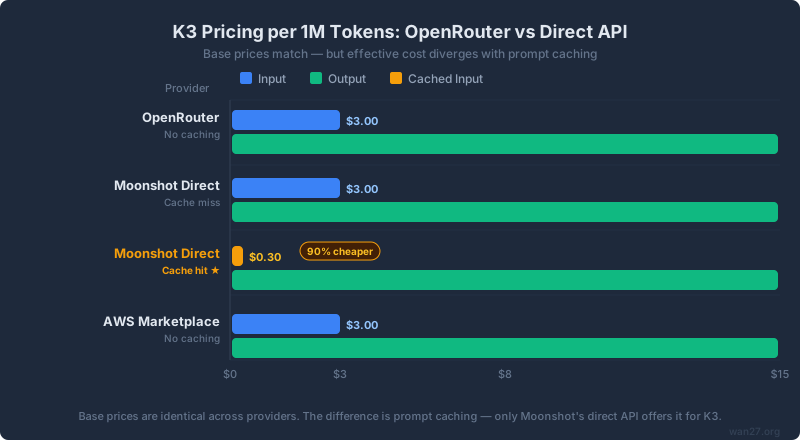
Most comparisons list the same $3.00/$15.00 numbers for every provider and stop there. That misses the single biggest cost variable in the K3 ecosystem: prompt caching.
Base pricing comparison
| Provider | Input / 1M tokens | Output / 1M tokens | Context window | Web search |
|---|---|---|---|---|
| OpenRouter | $3.00 | $15.00 | 1,048,576 | $0.015/call |
| Moonshot Direct API | $3.00 (cache miss) | $15.00 | 1,048,576 | $0.015/call |
| Moonshot Direct (cached) | $0.30 | $15.00 | 1,048,576 | $0.015/call |
| AWS Marketplace | $3.00 | $15.00 | 1,048,576 | TBD |
The critical number: Moonshot's direct API offers $0.30 per million cached input tokens — a 90% discount on cache hits. OpenRouter does not currently expose prompt caching for K3.
How prompt caching actually works at the API level. When you send a request to Moonshot's direct API, the server checks whether the beginning of your prompt (the "prefix") matches a recently seen prompt from the same API key. If it does, the server skips re-processing those tokens and charges the cached rate ($0.30/1M) instead of the full rate ($3.00/1M). The cache is prefix-based — your system prompt and the first N messages must be identical byte-for-byte. This is why applications with a long, stable system prompt benefit most: every request after the first hits the cache on the entire system prompt portion. Through OpenRouter, this caching is not available because your request passes through an intermediary — the prefix match against Moonshot's cache does not recognize OpenRouter-relayed traffic the same way. This is not a bug; it is an architectural limitation of routing through a third party.
What this means in practice
For a typical API workload with a 4,000-token system prompt that repeats across every request:
-
1,000 requests/day, 4K system prompt, 2K user input, 1K output per request:
- OpenRouter: ~$0.024/request → $24/day
- Direct API with caching: ~$0.018/request → $18/day (assuming 60% cache hit rate on system prompt)
-
10,000 requests/day, same pattern:
- OpenRouter: $240/day
- Direct API with caching: ~$170/day
The gap widens with longer system prompts and higher cache hit rates. If your application sends the same 50K-token context with every request, the direct API's caching saves substantially more.
Cost comparison vs other frontier models on OpenRouter
| Model | Input / 1M | Output / 1M | Context |
|---|---|---|---|
| Kimi K3 | $3.00 | $15.00 | 1,048,576 |
| GPT-5.6 Sol | $5.00 | $30.00 | 1,048,576 |
| Claude Fable 5 | $10.00 | $50.00 | 200,000 |
| Claude Opus 4.8 | $15.00 | $75.00 | 200,000 |
| GLM-5.2 | $1.40 | $4.40 | 128,000 |
| Kimi K2.7 Code | $0.72 | $3.50 | 262,144 |
K3 sits in the middle tier: 40% cheaper than GPT-5.6 Sol, 70% cheaper than Fable 5, but 2–3× more expensive than GLM-5.2 or the older K2.7 Code. The 1M context window at $3.00 input is unique — no other model at this tier offers that combination.
Rule of thumb: If your average prompt is under 8K tokens and you are doing fewer than 1,000 requests per day, the pricing difference between providers is under $5/day. Pick whichever provider minimizes integration complexity. If your prompts are long or your volume is high, the direct API's caching makes a measurable difference.
K3 gets the headlines, but it is not always the right Kimi model for every task. OpenRouter hosts the full Moonshot lineup — and the older models cost 4–20× less.
All 11 Kimi Models on OpenRouter: When K3 Is Overkill
K3 is not the only Moonshot model available. Here is the full catalog as of July 2026:
| Model | Model ID | Context | Input / 1M | Output / 1M | Best for |
|---|---|---|---|---|---|
| Kimi K3 | moonshotai/kimi-k3 | 1,048,576 | $3.00 | $15.00 | Frontier reasoning, coding, multimodal |
| Kimi K2.7 Code | moonshotai/kimi-k2.7-code | 262,144 | $0.72 | $3.50 | Budget coding tasks |
| Kimi K2.6 | moonshotai/kimi-k2.6 | 262,144 | $0.66 | $3.41 | Budget general use |
| Kimi K2.5 | moonshotai/kimi-k2.5 | 262,144 | $0.375 | $2.025 | Lowest-cost Kimi option |
| Kimi Latest | ~moonshotai/kimi-latest | — | — | — | Auto-redirect to newest |
Before K3 launched, K2.6 had processed over 386 million tokens on OpenRouter — this is not a new provider on the platform. Moonshot models have had consistent uptime and a track record on OpenRouter going back to the K2 era.
Rule of thumb: Start new projects on K3. Keep existing K2.6 or K2.7 Code integrations running if they meet your quality bar — the 4–5× price jump to K3 is only worth it when you need the quality upgrade. Test K3 on your hardest 10 prompts first, then decide whether to migrate everything.
Setup is fast, but first-time errors are common — and the error messages rarely explain what went wrong. Here are the five failures we see most often, with the exact fix for each.
5 Common Errors and How to Fix Each One
Error 1: "Model not found" (404)
Cause: Wrong model ID. The most common mistake is using moonshot/kimi-k3 (wrong organization prefix) or kimi-k3 (missing organization entirely).
Fix: Use exactly moonshotai/kimi-k3. The organization prefix is moonshotai, not moonshot.
Error 2: "Insufficient credits" (402)
Cause: Your OpenRouter account balance is zero or below the minimum threshold for K3's pricing tier.
Fix: Add credits at openrouter.ai/credits. K3 is a premium model — a single long-context request can cost several dollars.
Error 3: Timeout on long prompts
Cause: K3 with near-million-token context can take 30–60+ seconds to respond. Default HTTP timeout settings in most SDKs are 30 seconds.
Fix: Set your client timeout to at least 120 seconds. In the OpenAI Python SDK:
client = OpenAI(
    base_url="https://openrouter.ai/api/v1",
    api_key="your-key",
    timeout=120.0,
)
Error 4: Unexpected model behavior with ~moonshotai/kimi-latest
Cause: The ~moonshotai/kimi-latest alias silently redirects to the newest model. If Moonshot updates which model this points to, your application's behavior changes without any code change on your end.
Fix: Pin to moonshotai/kimi-k3 in production. Use ~moonshotai/kimi-latest only for experimentation.
Error 5: Tool calls returning empty or malformed responses
Cause: OpenRouter's tool schema translation may handle some edge cases differently than Moonshot's native API. Complex nested tool schemas or multiple parallel tool calls are most likely to show discrepancies.
Fix: Simplify tool schemas. Use flat parameter structures where possible. If complex tools fail through OpenRouter but work through the direct API, that is a translation layer limitation, not a K3 limitation.
Rule of thumb for debugging K3 on OpenRouter: If your request fails, check in this order: (1) model ID spelling, (2) account balance, (3) timeout setting, (4) model slug alias, (5) tool schema complexity. This order matches the actual frequency of each error — most failures are the trivial spelling issue, not the complex edge case.
Now that you know what can go wrong and how to fix it, the remaining question is strategic: given the three providers that host K3, which one should you actually use?
OpenRouter vs Direct API vs AWS: Decision Matrix for 6 Developer Profiles
Six situations, six different answers:
| Your situation | Best provider | Why |
|---|---|---|
| Already using OpenRouter for other models | OpenRouter | One API key, one bill, model switching with a string change |
| K3 is your primary model, high volume (>10K req/day) | Moonshot Direct API | Prompt caching saves 20–40% on input costs |
| Enterprise with existing AWS billing | AWS Marketplace | Use committed spend, no new vendor onboarding |
| Evaluating K3 alongside 3+ other models | OpenRouter | Fastest comparison — same SDK, same auth, different model IDs |
| Need Moonshot-specific features (native web search, custom tools) | Moonshot Direct API | Full feature access without translation layer |
| Running in Asia-Pacific, latency-sensitive | Moonshot Direct API | Moonshot's infrastructure is optimized for APAC routing |
Expert pitfall: "same pricing" does not mean "same cost." The direct API's prompt caching, Moonshot's occasional launch promotions, and OpenRouter's credit system all create real differences in effective cost. At 100 requests/day the difference is negligible. At 100,000 requests/day, it could be thousands of dollars per month.
Provider choice is settled. Before you scale up, protect yourself from the two risks that hit developers hardest in the first week: runaway costs and leaked API keys.
Cost Guardrails and API Key Security
K3 is expensive by open-model standards. A single 500K-token prompt with a 2K-token response costs roughly $1.50 input + $0.03 output = $1.53 per request. A bug in a loop can burn through $100 in minutes. Three safeguards to set up before you go to production:
Set a spending limit on OpenRouter
OpenRouter allows you to set a monthly credit limit per API key. Go to your dashboard → Keys → select your key → set a usage limit. Start with $50 for testing, then raise it once you understand your actual usage pattern.
Use separate API keys for testing and production
Create one key for development (low spending limit, verbose logging) and a separate key for production (higher limit, restricted to specific origins if your app is client-facing). If a test key leaks, your production traffic is unaffected.
Never expose your API key in client-side code
If you are building a web application, route API calls through your backend server. OpenRouter API keys in client-side JavaScript are visible in browser dev tools and network tabs. Use environment variables (OPENROUTER_API_KEY) on the server and proxy requests from your frontend.
Rule of thumb: The cost of one leaked API key running undetected for a weekend is higher than the cost of 10 minutes spent setting up key rotation and spending limits. Treat K3 API keys like database credentials — never commit them to version control, never log them, never embed them in client code.
Everything above covers the full setup-to-production path. The questions below address the specific points developers keep asking across forums and community channels.
Frequently Asked Questions
Is Kimi K3 available on OpenRouter?
Yes. K3 has been live on OpenRouter since July 16, 2026, the same day as its official launch. The model ID is moonshotai/kimi-k3.
What is the correct model ID for K3 on OpenRouter?
moonshotai/kimi-k3. The organization prefix is moonshotai (one word), not moonshot. The alias ~moonshotai/kimi-latest also works but is not recommended for production.
Is Kimi K3 on Together AI? As of July 17, 2026, K3 is not listed on Together AI. Moonshot's previous models (K2.6, K2.7 Code) were available on Together AI, so K3 may follow. Check back or monitor Together AI's model announcements.
How does K3 pricing on OpenRouter compare to the direct API? Base rates are identical: $3.00/1M input, $15.00/1M output. The direct API additionally offers cached input pricing at $0.30/1M — a 90% discount that OpenRouter does not currently match.
Can I use the OpenAI SDK with K3 on OpenRouter?
Yes. Change the base URL to https://openrouter.ai/api/v1 and use your OpenRouter API key. Everything else — message format, streaming, tools, structured output — works the same.
Does K3 on OpenRouter support vision (image input)? Yes. K3 is multimodal and accepts image inputs through the standard OpenAI vision message format on OpenRouter.
Core Summary
Getting K3 through OpenRouter is a 5-minute setup — but choosing the right provider for your workload is the decision that actually saves money.
- Model ID:
moonshotai/kimi-k3— notmoonshot/kimi-k3, notkimi-k3. - Pricing: $3.00/1M input, $15.00/1M output — identical to the direct API, but without the $0.30 cached input tier.
- Features: Streaming, tool use, structured JSON, vision — all work through the OpenAI-compatible endpoint.
- OpenRouter wins on integration speed, multi-model billing, and fallback routing.
- The direct Moonshot API wins on prompt caching (90% input discount on cache hits), native feature access, and APAC latency.
- AWS Marketplace wins on enterprise procurement through existing contracts.
Start here: copy the curl command from the setup section, paste it into your terminal with your OpenRouter API key, and confirm you get a response. That takes 30 seconds. Once the basic call works, swap in the Python SDK, add streaming, and run K3 against the 10 prompts that matter most to your workload. The model ID is the only new thing — everything else is the OpenAI format you already know.