Table of Contents
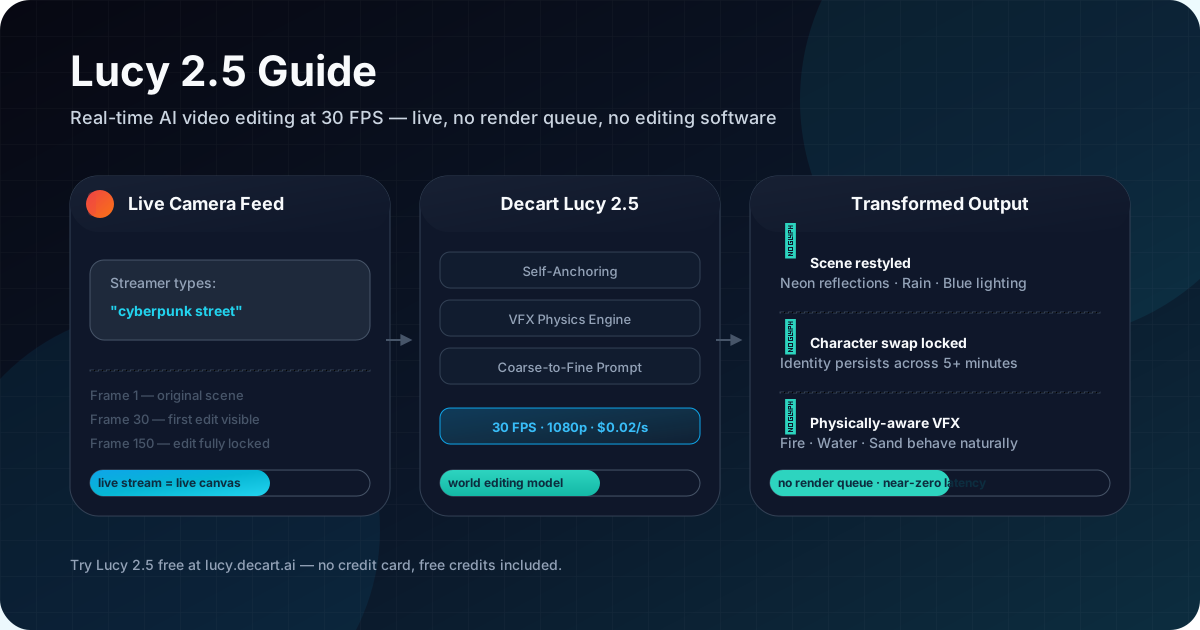
You are watching a live stream. The streamer types "turn this into a cyberpunk street" — and the scene shifts. Neon reflections appear on wet pavement. Rain starts falling. The lighting changes from warm to cold blue. No render queue. No editing software. The stream never stopped.
That is what Lucy 2.5 does. And it does it at 30 FPS, 1080p, with near-zero latency.
On July 16, 2026, Decart released Lucy 2.5 — a live AI model that edits video in real time, not as a clip rendered after the fact. The stream itself is the canvas. You edit it with text prompts while it is still streaming.
This guide covers what Lucy 2.5 is, how it works, what it costs, and where it fits in the real world. If you want to try it directly, start at lucy.decart.ai.
What Is Lucy 2.5?
Lucy 2.5 is a real-time world editing model from Decart, the company behind the Oasis interactive world model and the Decart Optimization Stack (DOS). Unlike traditional video generation tools that render a fixed clip from a prompt, Lucy 2.5 operates on live video streams — every frame is generated on the fly, responding to motion, lighting, and scene changes as they happen.
The core capability is simple to describe but hard to build: you point a camera at a scene (or use an existing stream), type what you want to change, and the output changes immediately. Character swap, environment restyle, object removal, physically-aware VFX — all applied to a live feed without stopping or rendering.
Decart raised $300M earlier in 2026, backed by Radical Ventures, Sequoia, and NVIDIA, making Lucy 2.5 the flagship product of a company valued as the infrastructure layer for real-time AI.
Three Things Lucy 2.5 Does That No Other Model Can
Edits That Stay Locked In
The hardest problem in live AI video is temporal consistency. Previous models could make a single frame look right, but the edit would drift, dissolve, or morph within seconds.
Lucy 2.5 introduces Self-Anchoring. A few seconds into a stream, the model captures its own generated output as a reference frame. Because that anchor comes from the model's own distribution — not from a static pre-rendered image — the guidance signal stays sharp across the entire stream.

Combined with Smart History Augmentation, this means:
- A character swap made in the first second of a stream is still stable five minutes later.
- Subjects can leave frame, turn around, and return without the edit breaking.
- Stability compounds over time instead of decaying.
Physically-Aware VFX
Lucy 2.5 handles visual effects that behave like real physics. Fire flickers naturally. Water flows around objects. Sand shifts under contact. Slime stretches and drips. These are not canned animations — they emerge from the model's understanding of how materials interact with the scene geometry.
Rule of thumb: if the effect would behave differently in the real world based on the surface it touches, Lucy 2.5 will reflect that. Fire on wood behaves differently from fire on water.
The team behind Lucy 2.5 built this capability by engineering a massive synthetic corpus of video editing data. They propagated static image edits across full video sequences using internally-trained models, creating temporally consistent training pairs at a scale that does not exist in organic footage.
Coarse-to-Fine Prompt Control
Lucy 2.5 uses a two-layer prompt system:
- Coarse: A simple instruction — "change this character to a knight"
- Fine: Position, style, color, size, and material details — "silver armor, red cape, standing on the right side, afternoon lighting"
This hierarchy lets users iterate quickly with broad strokes, then lock in precise details without redoing the entire edit.
One practical pattern: start every edit with the coarse prompt, let the model generate 2-3 seconds of output, then layer in the fine details. This avoids over-constraining the model before it establishes the base transformation.
Lucy 2.5 Pricing: $0.02 per Second, No Subscription
Decart uses pay-as-you-go pricing with no subscriptions or minimums.
| Mode | Resolution | Price |
|---|---|---|
| Realtime | 720p | $0.02 / sec |
| Video edit | 720p | $0.04 / sec |
| Image edit | 720p | $0.02 / image |
Real-world examples:
- A 30-second live Lucy 2.5 session: $0.60
- A 5-second video edit: $0.20
- An image edit: $0.02
New accounts receive free credits for testing.
Quick Start: How to Use Lucy 2.5
Getting started takes about five minutes:
- Create an account at platform.decart.ai — free credits are applied automatically.
- Open the live demo at lucy.decart.ai to test in your browser without writing code.
- Point your camera at a scene — yourself, a room, an object. The model works with any live camera feed.
- Type a prompt — start broad ("make it look like rain") then refine ("add neon signs, darken the background").
- Watch it change live — the edit applies to the stream as it runs. If it is not quite right, adjust the prompt.
The coarse-to-fine approach works best: start with a simple edit instruction, then layer in position, style, color, and size details.
Who Is Using Lucy 2.5 Right Now
The announcement tweet hit 2.5M views in under 48 hours. Kfir Aberman's launch thread earned 6K likes. Early testers are not just impressed — they are streaming with it.
Justine Moore tested the model live on X, calling the "latency and character consistency impressive." Streamers demonstrated real-time outfit swaps, environment changes, and full scene genre shifts with a single prompt. One streamer changed a "boring stream into a music video by typing one sentence."
Live Commerce
Virtual try-on moves from static product pages to live video. A model wears one outfit, and the stream swaps to a different look on command. Shoppers see how garments move, drape, and behave in real time rather than staring at flat product shots.
Advertising
One ad shoot becomes infinite variations. The same base footage gets real-time localization — swap the background to match a different city, change the product color, or adapt the talent's appearance for different markets — all without reshooting or post-production.
Streaming and VTubing
This is where Lucy 2.5 has generated the most buzz so far. Streamers can change their avatar, outfit, or entire scene environment live without loading new assets. Multiple demos showed real-time character swaps and joint arm movement — where the AI-generated character mirrors the streamer's physical movements with near-zero delay.
Gaming
Lucy 2.5 integrates interactive AI-generated elements into live gameplay feeds. Environment restyling, real-time character modification, and dynamic VFX that responds to in-game events.
The common thread across all these use cases is that Lucy 2.5 treats video as a live, mutable surface — which is a fundamentally different approach from how previous generation models worked. Here is how Lucy 2.5 stacks up against Lucy 2.0.
How Lucy 2.5 Compares to Lucy 2.0
| Capability | Lucy 2.0 | Lucy 2.5 |
|---|---|---|
| Resolution | 720p | Up to 1080p |
| Frame rate | Real-time | 30 FPS |
| Temporal consistency | Basic | Self-Anchoring |
| VFX | Limited | Physically-aware |
| Prompt control | Single-level | Coarse-to-fine |
| Generalization | Instruction-specific | Emergent from synthetic data |
| Object removal | Partial | Clean background reconstruction |
The jump from Lucy 2.0 to 2.5 was not just a model update — it required rethinking the entire inference stack to hit 30 FPS at 1080p. Here is what changed under the hood.
Under the Hood: The Inference Stack
Real-time 30 FPS video generation at 1080p is computationally intense. Decart made three key optimizations to make it work:
Low-precision quantization — MXFP8 (Microscaling FP8) and NVFP4 formats deliver up to 4x speedups on compute-bound operations using native hardware support. The model maintains output quality by applying different precision levels to different parts of the network — attention heads get higher precision than feed-forward layers.
Dynamic sparse attention — The model identifies redundant computations in each attention call and prunes them with no accuracy loss. Since attention dominates the transformer forward pass, this is where the biggest latency gains come from.
Deeper kernel fusion — More aggressive fusions and improved megakernels reduce HBM transfer overhead and launch latency, critical for maintaining consistent frame timing.
These optimizations sit on top of the Decart Optimization Stack (DOS), which Decart describes as running across NVIDIA, AWS Trainium, and Google TPU hardware.
Common Pitfalls and How to Avoid Them
Lucy 2.5 is powerful, but it has sharp edges. Here are the most common issues users run into and how to handle them.
Over-constraining the Prompt
Symptom: You write a detailed prompt and the edit looks unnatural — objects clip, colors wash out, or the model ignores parts of the instruction.
Root cause: The coarse-to-fine hierarchy works in one direction. If you jump straight to fine-grained details, the model has no base transformation to anchor on.
Fix: Start with the coarse prompt alone. Wait 2-3 seconds. Then add fine details one layer at a time — position first, then style, then color.
Edit Drift in Complex Scenes
Symptom: The edit holds for a few seconds, then gradually shifts — a character's outfit subtly changes color, or a background element slowly morphs.
Root cause: Self-Anchoring works best when the scene has clear, stable geometry. Rapid lighting changes, fast camera movement, or multiple simultaneous edits can weaken the anchor signal.
Fix: Limit yourself to one major edit per stream segment. If you need to change multiple elements, do them sequentially with 5-10 seconds between edits. Restart the stream if the drift becomes visible.
Cost Overruns on Long Streams
Symptom: You leave a stream running and come back to a higher-than-expected bill.
Root cause: At $0.02/sec, a 30-minute realtime session costs $36. Lucy 2.5 does not have an auto-stop.
Fix: Set a timer before starting. Use the video edit mode ($0.04/sec for short clips) instead of realtime for pre-planned edits. The free credits cover roughly 30-60 seconds of realtime or 15-30 seconds of video edit — plan your test accordingly.
Complex Human Anatomy
Symptom: Hands, fingers, or facial details look distorted when the model edits a person in the frame.
Root cause: Lucy 2.5, like most generative video models, handles complex human anatomy less reliably than simpler geometry. The model is trained on synthetic video editing data, and fine motor details remain a known limitation.
Fix: Avoid tight close-ups on hands or faces when making structural edits. Keep subjects at medium-to-full body distance. For VTubing, use character swaps rather than editing facial features directly.
Rule of thumb for cost: if your edit takes longer than 30 seconds of realtime to get right, switch to video edit mode and iterate on short clips instead.
FAQ
Is Lucy 2.5 free to try?
Yes. New accounts on the Decart platform receive free credits to test the API. The experience page at lucy.decart.ai lets you try a live demo.
How is video billing calculated?
Realtime sessions are billed per active generation second. Video edit jobs are billed per generated second of output.
Can Lucy 2.5 remove objects from a live feed?
Yes. When an element is removed, the model reconstructs the exposed background geometry and maintains consistency over time.
What hardware does Lucy 2.5 run on?
Lucy 2.5 runs through Decart's API on optimized GPU infrastructure, including NVIDIA, AWS Trainium, and Google TPU, managed by the DOS stack.
Is Lucy 2.5 open source?
Lucy 2.5 is available via Decart's API platform. Decart has not announced open-source plans for Lucy 2.5.
How does Lucy 2.5 handle character consistency over long streams?
Self-Anchoring captures a reference frame from the model's own output early in the stream. The model learns to exploit this anchor during training, so edits stay locked in even after minutes of continuous generation.
Try Lucy 2.5 in Five Minutes
The fastest path is the live browser demo at lucy.decart.ai — no code, no credit card. Point your camera, type what you want to change, and watch the stream transform.
For API access, create an account on platform.decart.ai to get your free credits and API key. A 30-second realtime session costs $0.60 — the free credits cover plenty of testing.
For more AI video and world model comparisons, check out Wan 2.7 Complete Guide for text-to-video and image-to-video workflows, or Kimi K3 Explained for another perspective on generative video models.